

How to Reduce Cost Per Lead in Google AdWords
As with any kind of marketing endeavor, being focused and familiar with the wants and the needs of your audience is critical to the success of your Pay Per Click campaign. Of course, using careful targeting tactics to determine this audience can result in money saved for you. Reducing your cost per lead in Google AdWords takes research and data, but the marketing dollars you’ll save as a result are well worth time spent during planning and testing phases.
Now that you’ve been tasked with reducing these base costs, what are some simple steps you can take to reduce ad dollars spent on generating potential leads? One of the most important things one can do is go back to the basics.
This is how:
- Select exact and phrase match keywords
- Carefully review actual search queries
- Integrate negative keywords into your existing campaigns
- Reduce your average cost per click
By considering these key factors, and taking necessary steps to test and track your campaigns, you’ll be well on your way to discovering more relevant leads at a lower cost.
Hone-In on Exact and Phrase Match Keywords
You already know that PPC is a game of specifics. The more specific you can be in terms of selecting keywords and anticipating potential search queries, the more likely you are to reach a relevant audience. While it’s always tempting to fall back on broad match keywords, the “catch all” net is rarely cost effective.
When you’re able to pinpoint your audience and target them at the granular level, your ad copy becomes more effective and your keyword bidding becomes more precise as a result. Try thinking of match types as a large group of people. A broad match type might be a person who lives in Chicago, a phrase match might be someone who lives in Chicago who owns a vehicle and an exact match would be a person in Chicago who owns a Toyota Camry.
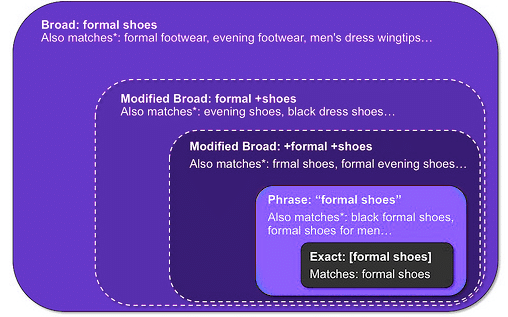
Source: Blue Beagle
When you know that you want to speak to those Camry owners, you can write relevant ads that speak to their specific needs and interests as consumers, thus stimulating click thru rates. Over time, you’ll also develop a sense of which audiences are most valuable to you, thus influencing the success of future campaigns.
Analyze and Review Search Queries
You cannot craft an effective PPC campaign without analyzing the return of actual search queries. To ignore this important factor is to ignore the needs of your most valuable potential customers. If while examining these search queries, you discover that less desirable audiences may be triggering your ads, consider integrating negative keywords to reduce wasted ad spend. You may also stumble on new keywords that show potential for drawing relevant searchers and high performing ads. Assign a higher budget to these new keywords, as well as any existing keywords that have a proven track record of success.
Don’t be Afraid to Integrate Negative Keywords
The word “negative” carries a lot of weight, but in this case, opting for “negative” can result in positive growth for your PPC ad revenue. By integrating negative keywords into your existing campaigns, you can do three things:
- Help eliminate the potential for irrelevant searches.
- Show your ads to people who are more likely to click through.
- Reduce your overall costs by eliminating keywords that are costing you money without return.
When you use negative keywords, you eliminate the possibility of serving ads to people who are unlikely to convert. For example, if you’re a company that sells gardening tools, you would want to prevent your ad from being served to searches that include “power tools.” By setting “power” as a negative keyword, you ensure that your ad is served on more relevant queries.
Reduce Your Cost Per Click (CPC)
Every time a searcher clicks on your ad, a portion of your marketing dollars is spent. Reducing this base expense will ultimately help you reduce your CPL. The easiest and most rapid way to reduce your CPL is by lowering the amount spent on keyword bids. Cost Per Click (CPC) and conversion rate (CR) are both instrumental in determining your CPL, therefore when CPC is reduced, so is CPL- assuming conversion rate is constant.
You can calculate Cost Per Lead with this formula CPC / CR = CPL. So for example if your cost is $0.50 per click and you have a conversion rate of 10% (50 / .1 = $5.00) your CPL is $5.00. Assuming your conversion rate doesn’t change with position, if you reduced your CPC 20% ($0.40) your CPL will decrease 20% as well (.40 / .1 = $4.00).
Improve Your Quality Score
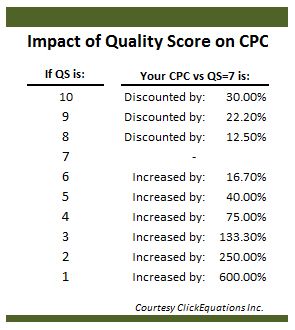
Quality score is determined by three primary metrics:
- CTR
- Ad relevance
- Landing page relevance
Naturally, you can improve your QS by increasing your Click-Through Rate (CTR), improving the relevance of your ad to the audiences whom you most want to reach and by improving the user experience on your landing page. When writing ad copy, err on the side of clear, concise and specific.

An example of an ad utilizing Dynamic Keyword Insertions to make the headline even more relevant.
Misleading ad copy, or ads that click through to irrelevant or unclear landing pages cost you money with little potential for return. Of course, you can’t just expect ad copy to work on its own either, testing and retesting are essential to your overall success. [bctt tweet="#PPC ads that click thru to irrelevant landing pages cost $ with little potential for return."]
Implement A/B Testing for Ad Copy and Landing Pages
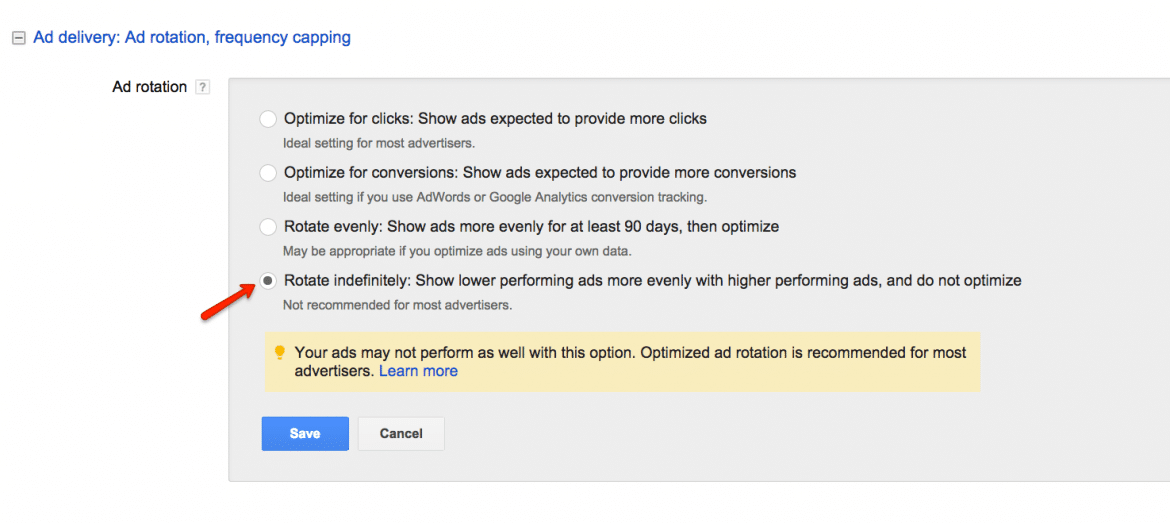
One way to determine the effectiveness of ad copy is through split A/B Testing. A/B testing refers to the practice of serving two comparable ads with differing ad copy to test groups, and determining which one performs better. You can write two ads with different ad copy which direct to the same landing page. Over time, you will be able to identify which version is driving the highest click-through-rate and conversion rate. AdWords offers several options for optimization.
- Optimize for Clicks: Show ads expected to provide more clicks
- Optimize for Conversions: Show ads expected to provide more conversions
- Rotate Evenly: Show ads more evenly for 90 days and then optimize
- Rotate Indefinitely: Show lower performing ads more evenly
Next visit your campaigns settings and choose the third option, “Rotate evenly: Show ads more evenly for at least 90 days, then optimize.” Doing so will allow you to see which ad copy performed best over the last 90 days and the most effective ads will be served automatically on relevant queries.
Implementing A/B Testing for Landing Pages is very similar to testing ad copy. In this case however, use two ads with identical copy in same ad group and set the ads to direct to two different versions of your landing page. Within your campaigns settings, change the Ad Rotation setting and select the third option, "Rotate evenly: Show ads more evenly for at least 90 days, then optimize." This will reveal which landing page is performing better with your intended audience.
Utilize Ad Extensions
Ad Extensions are another way to improve the performance of your ads. Utilizing extensions can improve overall Ad Rank, and higher Ad Rank translates into higher positioning. Callouts and Sitelinks are a good place to start for beginners, however AdWords offers a variety of extensions to benefit any business (listed below). Visit the “ad extensions” tab on the main AdWords navigation to get started.
Here are brief overviews of the seven types of ad extensions:
- App Extensions – Useful for companies that offer app-based technology as it allows searchers to easily download your app. Note: If you operate on both iOS and Android, you will need to add your app extension twice.
- Call Extensions – Useful for businesses that offer urgent services or who get most of their initial inquiries in the form of phone calls as it allows searches to directly call through to their main line rather than get redirected to the website first.
- Location Extensions – Useful for businesses with brick and mortar storefronts as it reveals locations that are nearby the search.
- Review Extensions – Useful for companies that have credible reviews online as it allows them to share review copy outside of the limitations of the ad text.
- Sitelink Extensions – Useful for almost any company, especially those with multiple kinds of products or services, as it allows searchers to click directly through to the pages featuring specific products/services that are of interest to them. It also provides a heftier ad with more eye-catching headlines.
- Callout Extensions – Useful for companies that want to showcase what makes them different from their competitors by calling out special promotions, guarantees, free shipping, etc.
- Structured Snippets – Useful for companies like retail stories, airlines and hotels that want to highlight specific services or products offered. This is the newest ad extension and it gives the company more control over the detailed information that Google serves to searchers.
Determine Landing Page Relevance
To measure landing page relevance, visit your Keywords Tab in AdWords and hover over specific keywords to reveal how their associated landing pages are performing.
Above Average is the best result, and your quality score (QS) will not be negatively effected by your landing page experience.
Average indicates that your landing page provides a satisfactory experience for users and your QS will not be effected negatively.
Below Average however, indicates that you’ve received the least desirable rating and your QS may drop as a result. Below Average rankings can result in higher CPC rates and the potential that your ads are not being served on qualifying search queries. Monitoring this rating and making simple changes to ensure that your website is relevant, trustworthy and easy to navigate can drastically improve your landing page relevance.
Analyze Campaign Performance with Segments
Taking time to look at the performance of your overall campaign can seem daunting, especially when you’re unfamiliar with the tables and reports that explore items like daypart, device, location, and more. It’s a lot. That said, having a clear sense of whether your campaign is effective will provide the big picture view necessary for reducing your cost per lead.
You can start by analyzing how your campaigns are performing by using the Advertising Report titled: “AdWords Hour of Day.” This report lets you view the statistical performance of your campaign by day of the week and even hour of the day. For example, if you’re a company that offers travel packages to beach resorts and other vacation destinations, you may want to run your ads during times like 11 AM to 1 PM or from 5 PM to 7 PM to target typical 9-5 office workers who may be more apt to peruse their dream destinations during lunch breaks or after the work day is complete.
You may want to use times that are assumed to be most effective for engaging your target audience and then review this report to determine whether your assumptions were accurate. Sorting options within the report labeled “Avg. Session Duration” or “Goal Completions” can help to reveal whether there are certain parts of the day that users spend more time on your website or result in conversions.
Keyword filters can be added to identify high performance keywords and how they correspond to different hours of the day. If you find that your intended audience spends more time on your site or converts more often during certain hours, you can bid accordingly so that your ads are served more frequently during those hours.
You may also choose to use Segments from your Campaigns tab and select “Time” to analyze performance by day of week or hour of day. Using this segment, you can also analyze a specific day, week, month, quarter or year.
Filtering by Device
Device is another popular segment by which to measure Campaign performance. Start by clicking on the “Campaigns” tab then click the “Segment” button located above the statistics table. Select a segment from the drop down menu to add this filter to your campaign. By choosing the segment labeled “Device,” you’ll be able to compare performance across devices including computers, mobile devices and tablets.
Optimize PPC Ad Costs with Location Reports
Finally, measuring campaign performance by location is also important, and can easily be determined by using Location Reports. These reports in AdWords will reveal geographic locations of your prospects, or where you many have potential untapped audiences. First you will need to apply location targeting settings to your campaign. After some time, you can visit the Settings tab under locations to monitor and track performance. You will be able to see data from two different kinds of location reports:
- What triggered your ad (geographic): This report will reveal your customers’ physical locations as well as locations they had showed interest in based on searches or content they had viewed. For example, if someone was searching for ski lodges in Colorado and you are a company that sells skiing equipment, you may still want to target these potential customers, even if they are physically located in a place like Florida. They might own a vacation home, or travel often for the sport.
- Where your users were (user locations): In this case, you will see only your customers’ physical location regardless of whether or not they may have shown interest in another location.
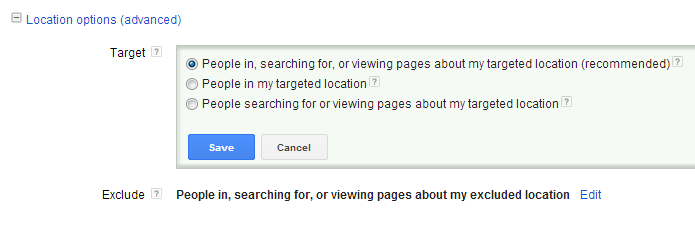
This kind of information can help you ensure that you are targeting users in the right locations and not spending money in geographic areas that are less likely to produce conversions and leads.
In Conclusion
As you can see, there are several things to keep in mind when it comes to reducing your cost per lead in Google AdWords. Take some time to learn the factors that can contribute to its reduction and you’re sure to see your CPC reduced and your ads paying higher dividends than before.