

The Best Tools for Local SEO
There’s no shortage of SEO tools that can help improve your rankings—but what about tools that are specific to local SEO? Since local search relies on different ranking factors than typical organic search, it calls for unique tools and tactics.
Local search results are dependent on proximity to the searcher, which can make tracking rankings and determining next steps difficult. Below, we’ve assembled a list of tools to help you make the most of your local search campaigns.
Google My Business (GMB) Tools
Google My Business—officially called the Google Business Profile—is an essential service for any business with physical locations. By creating a business listing on Google, you make it much easier for your customers to find you. Your Business Profile is also a great place to provide detailed information about the types of services your company offers.
That being said, keeping your listings up to date can be challenging, especially if your business has numerous locations. We use the following tools to manage our clients’ GMB listings.
GMBspy
Selecting primary and secondary categories within your Google Business Profile is one of the most critical optimizations you can make for local SEO. Wouldn’t it be helpful if you could discover which categories your competitors are using?
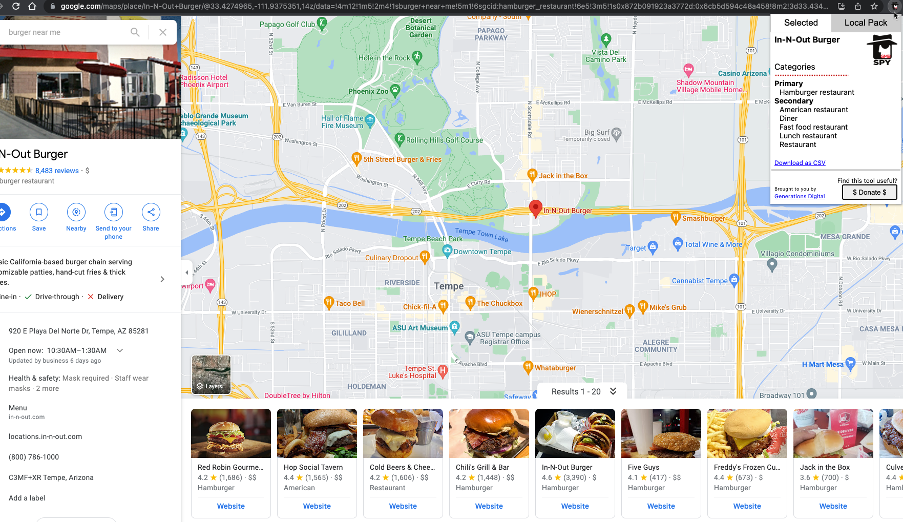
Fortunately, GMBspy makes this possible. GMBspy is a free chrome extension that you can use to discover additional categories that may be relevant for your business.
Just download the extension, click on a competitor listing within Google Maps and select the tool. The extension will drop down and display the primary and secondary categories for the highlighted listing.
Want to keep on top of the latest GMB categories? Sterling Sky’s “Google My Business Category Changes by Month" article does an excellent job of tracking new categories as they are added. We like to check in monthly to see if there are any additions that would be useful for our clients.
Postamatic
Postamatic is an essential Google Sheet add-on for managing businesses with multiple locations. It helps automate tedious processes such as uploading GMB posts or adding Q&As to your GMB profile.
We have used Postamatic to help our multi-location clients leverage the power of Google Posts. It allows us to post across their different locations without spending hours manually uploading posts to individual listings.
After the initial setup, creating different Google Post types with Postamatic is a breeze. Here is a quick video about how to set up and use this tool.
Location-Based Ranking Tools
Tools that provide you with location-specific SERP rankings are crucial for understanding how your website is ranking for local SEO keywords. Many of these tools present results in a search grid that can help you visualize how rankings change across geographic locations.
We like to use location-based ranking tools to get a feel for how a client is ranking at the beginning of an engagement. Then, we track the progress of local keyword rankings as we implement optimizations.
Places Scout
Places Scout allows you to select a grid layout ranging from 3x3 to 11x11. Each point on the grid will show you how your website or Google Business Profile ranks for your chosen keyword. In addition to viewing the rankings as a grid, the tool makes it easy to export this keyword data to custom reports.
You can select up to six different search engines that you want to track:
- Google Organic
- Google Maps
- Bing Organic
- Bing Maps
- Google Mobile Organic
- Google Mobile Maps
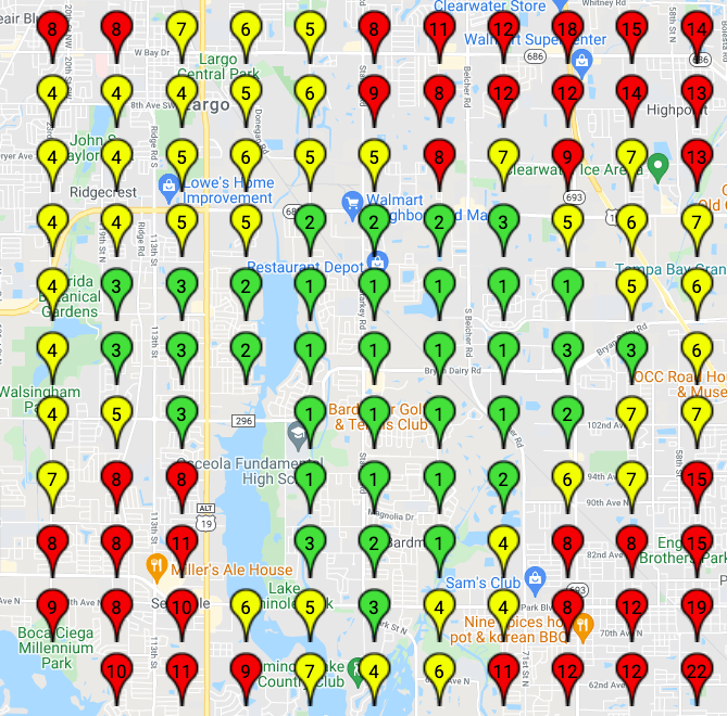
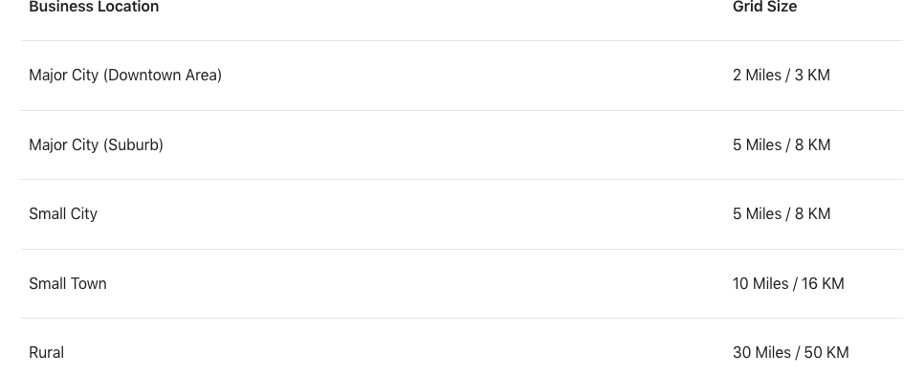
Places Scout lets you choose how large of a radius you would like to scout. If you are searching for rankings within a dense city, a smaller radius will give you more accurate results. We have found the following radiuses works best, depending on where your business is located:
Source: Local Falcon
Places Scout does charge per keyword, so the cost could add up quickly if you are tracking multiple keywords across multiple locations.
Best Use Case: If you have a large budget and want to get into the nitty-gritty, Places Scout is the right tool for you.
BrightLocal
Similar to Places Scout, BrightLocal offers grid-based keyword tracking. While it only focuses on Google Maps as opposed to multiple search engines, it does provide some insights that other tracking tools don’t.
In addition to displaying rankings for your business, BrightLocal will display competitors for your search and provide valuable data such as reviews, ratings, categories and authority scores. It will also show you where these competitors are in proximity to your location.
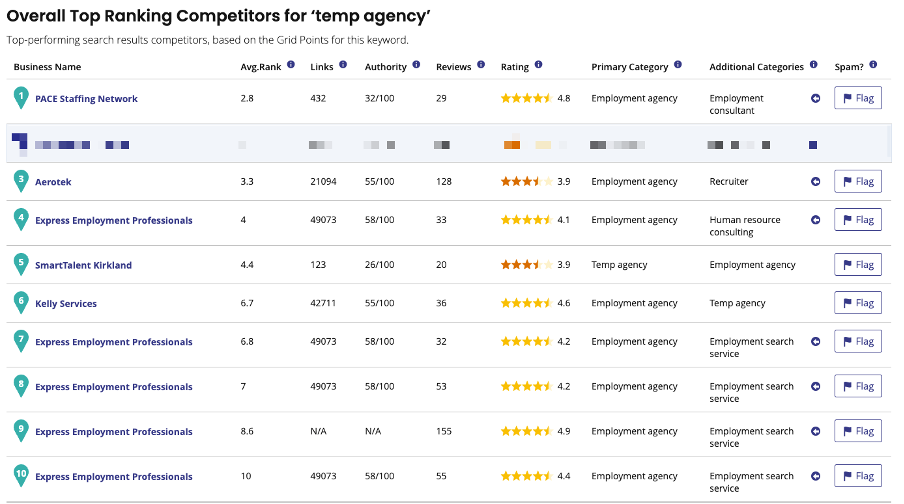
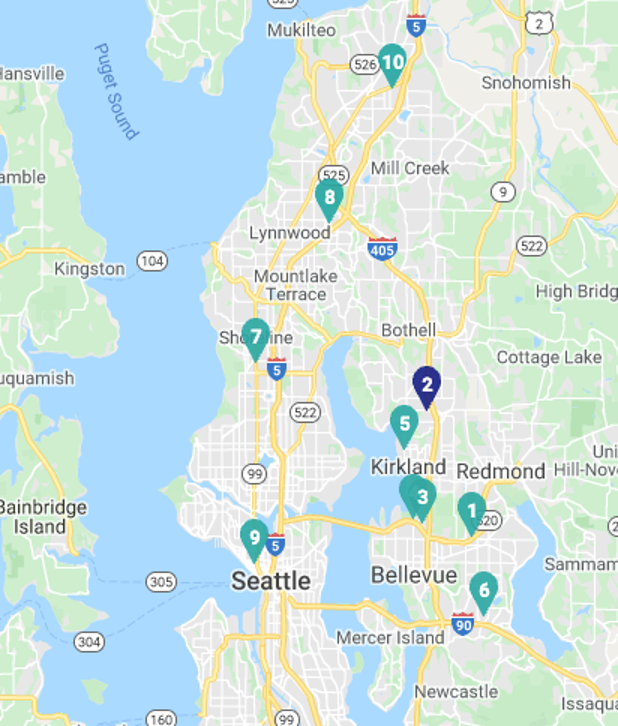
BrightLocal’s organic keyword roll-up reports searches keywords at the ZIP code level of submitted locations, and then combines this data into a full report.
One downside of BrightLocal’s grid tracker is that it can be difficult to make sense of reports that include data for multiple locations.
Best Use Case: Bright Local is a good value for agencies and businesses with fewer locations.
Local Falcon
Like other tools, Local Falcon provides its rankings as pin points on a grid. The main difference between Local Falcon and other local SEO tracking tools is that it doesn't require a subscription. Instead, you have the option to pay as you go by purchasing search credits.
Local Falcon prides itself on using multiple scan points for each location in its search results, as opposed to simply using ZIP code centers. This specificity of data gives you a more accurate look at rankings within a given neighborhood.
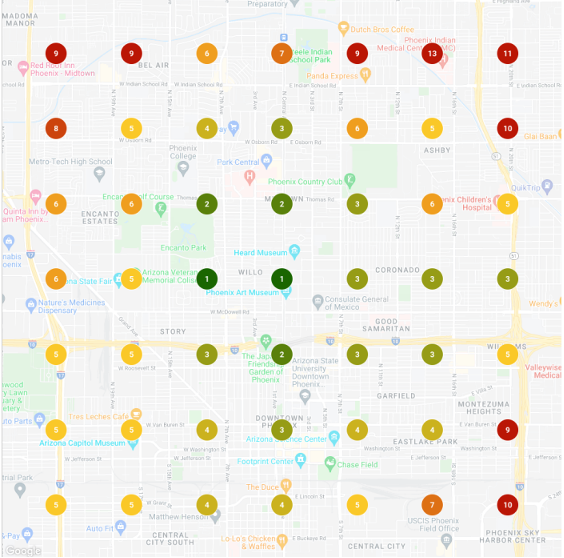
Because of its pay-as-you-go option, Local Falcon may be a good choice for companies located in less competitive areas who do not need to reference local search results as often.
Best Use Case: Local Falcon is great for accessing local search grids on an ad-hoc basis.
Merkle’s Local Search Results Tool
The free-to-use Local Search Results Tool offered by Merkle allows you to spoof your location to see what SERPs look like within a specific city or ZIP code. This is a great way to perform one-off local searches without having to rely on a subscription-based tool.
While this tool doesn’t let you narrow in on specific coordinates, it can be useful for quickly spot-checking your client’s local rankings or performing some basic competitor research.
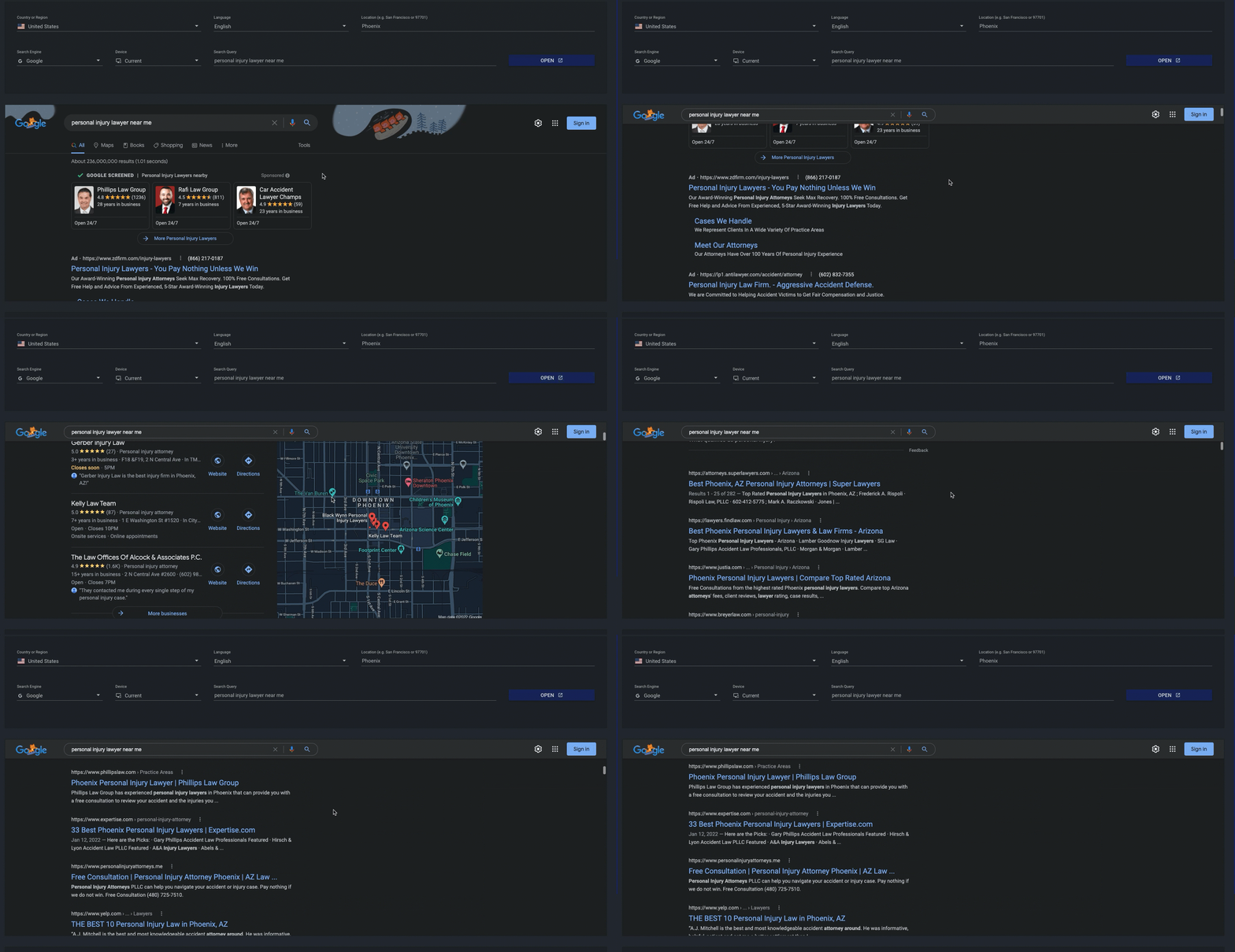
Best Use Case: This tool is ideal for quick spot checks, looking into ad-hoc requests and performing competitor research.
Citation Tools
Citations are listings in business directories that send validation signals to Google. Though citations are not as important as they once were, they are still a valuable aspect of local SEO.
The size of business as well as how frequently your business’s information changes will determine what type of citation management tool you need.
BrightLocal Citation Builder
BrightLocal doesn’t just offer grid-based rankings—they also have a Citation Builder tool. For a one-time fee, BrightLocal will submit your business to a range of relevant citation websites. They also clean up inaccuracies in existing citations and remove any duplicate listing.
For small businesses that rarely need to update details within listings, BrightLocal’s Citation Builder may be the cost-effective solution you’re looking for. If you do need to make changes to a citation (for example, if one of your offices moves locations), BrightLocal charges a one-off fee of $3 for each listing that needs updating.
Best Use Case: BrightLocal’s Citation Builder works well for companies who are looking for one-time citation building without ongoing maintenance.
Whitespark
Whitespark’s Local Citation Finder tool uncovers new citation listing opportunities for your business, and allows you to save and track all of your existing citations. It works by analyzing your competitors’ citations and flagging any listings that your business is missing.
Keep in mind that although Whitespark provides you with a list of citation opportunities, you will be responsible for submitting the listings yourself. While this does give you an opportunity to double check that all information is correct, it can also be time consuming.
Whitespark’s citation campaigns rerun every week to find new citation opportunities for your locations.
Best Use Case: Whitespark is a competitor-based citation tool that monitors new opportunities over time.
Uberall
Uberall has API connections with prominent local citation sources such as Google Business Profile, Apple Maps and Yelp. These API connections ensure that information is pushed out quickly and citations remain up to date.
According to Uberall, they work with a global network of 125+ platforms for local search. In addition to publishing citation listings in real time, the tool will address any incorrect or missing information that it finds across citation listings.
We would recommend this platform for large businesses with more than 15 locations.
Best Use Case: Uberall is a good choice for multi-location chains looking to make location management easier.
Analysis Tools
It’s not enough to simply make optimizations to your client’s site because similar optimizations have worked for you in the past. Every recommendation you make should be based on data and analysis.
There are a couple key tools that help us understand how users are currently finding our clients’ sites.
Google Trends
We like to use Google Trends to analyze seasonal trends and identify up-and-coming keywords.
The COVID-19 pandemic led to massive shifts in consumer behavior that disrupted traditional keyword seasonality. With Google Trends, you can monitor how keyword interest changes over time. While a drop in traffic to your clients’ site may be due to a rankings change, seasonality or current events can also play a role.
For example, say you have a new client in the gym and fitness industry. Over the last few months, the client has seen continual dips in site traffic. By looking at the "gym near me" keyword in Google Trends, you can see that the search interest started dropping around the beginning of June and did not start to rise again until the end of November (suspiciously, right after Thanksgiving).


You could be implementing all the right optimizations for this client, but you might still see drops in traffic simply due to people not being interested in your services at the given time.
Google Search Console
The mix of people entering your site via organic search vs. Google’s local three-pack can be surprising. We find that most local traffic hitting our clients' sites comes from the local three-pack. By implementing parameter strings on your Google Business Profile listings, you can see what people search for and click on when searching in Maps or using the local three-pack.
If you haven't already added parameter strings to the URLs in your Google Business Profile listings, you’ll want to add those immediately. Here is an example of what we like to use:

Once you have these URLs implemented, you can go into Google Search Console and filter for pages that contain parameter strings.
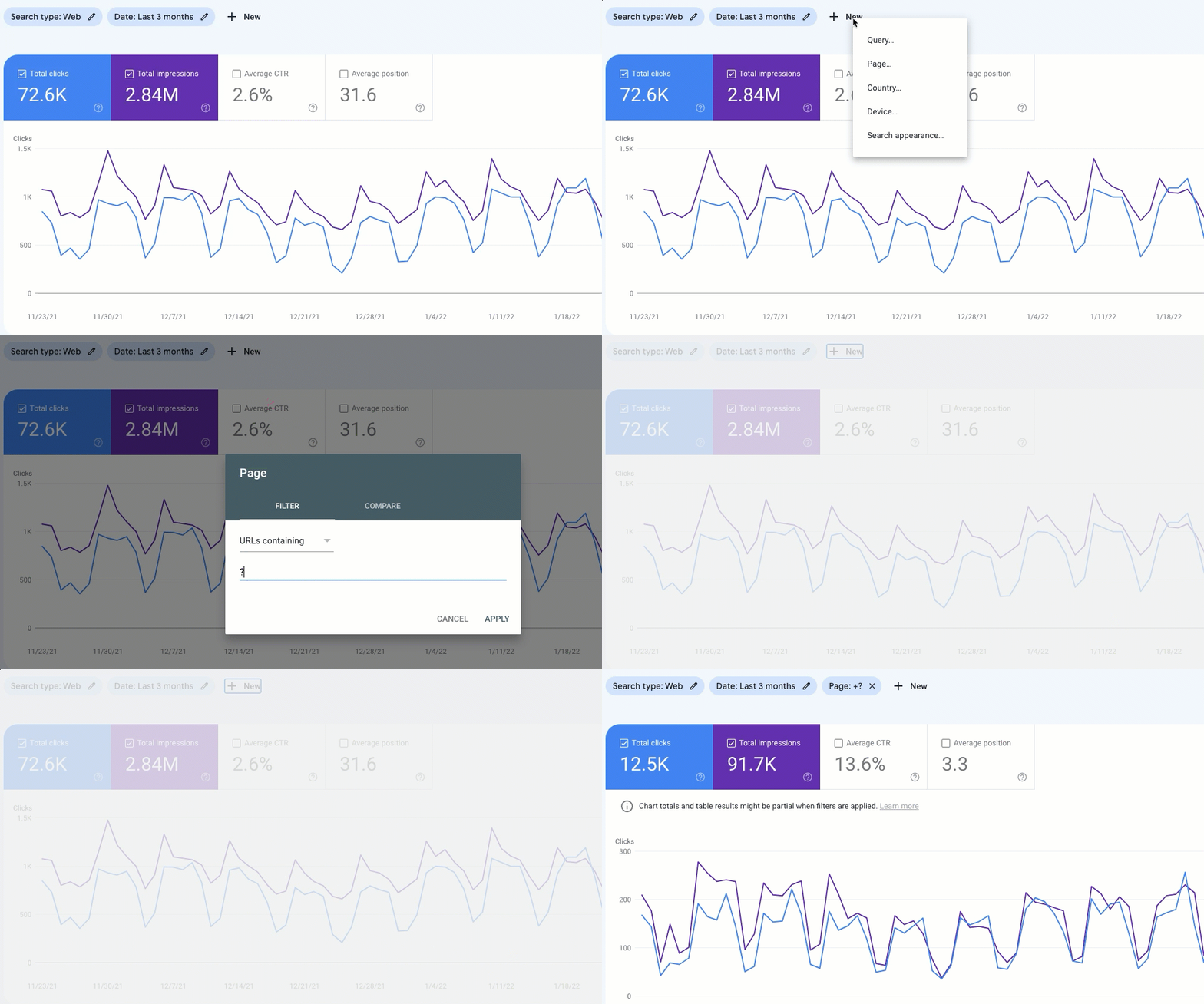
By using this filter, you can view all of the URLs that are included on the client’s GMB listings.
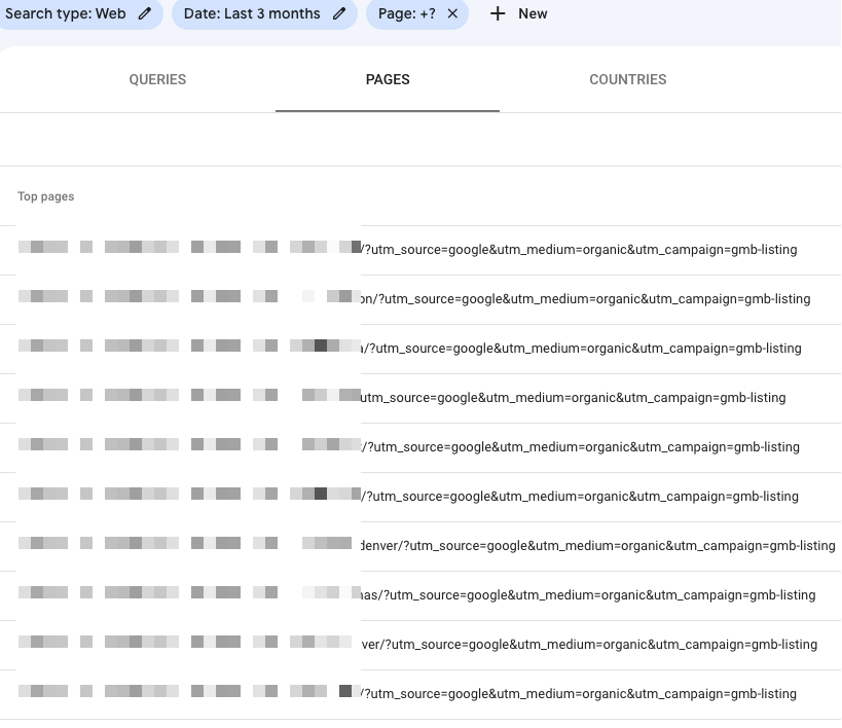
From here, you can click over to the queries tab and filter out the client’s brand name. This allows you to see what unbranded queries have been driving clicks to the website.
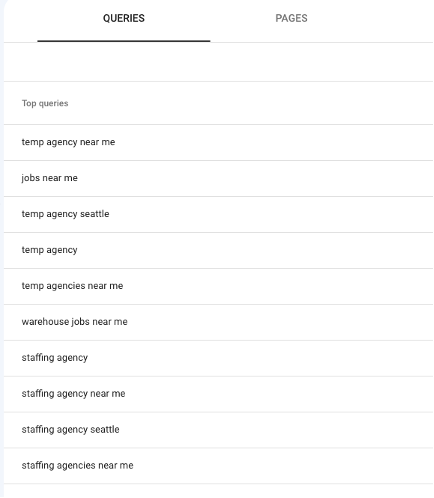
This can be a great way to get a feel for what type of queries you should be optimizing around.
Other Useful Resources
While not technically tools, there are several other resources we refer to on a regular basis that should be part of your local SEO arsenal.
Local Search Forum
It’s a good idea for all local SEOs to keep tabs on Sterling Sky’s Local Search Forum.
The forum is an excellent resource for when you inevitably run into problems you haven't had to deal with before. By searching the forum, you can learn from knowledgeable and helpful SEOs who have dealt with similar issues. If you subscribe to their newsletter, the Local Search Forum will even send you the most commented and valuable threads of the week every Wednesday, so you can keep up to date on what’s happening in the world of local SEO.
Newsletters
Speaking of newsletters, there are two additional newsletters we recommend subscribing to: Sterling Sky's weekly newsletter and Whitespark's monthly newsletter.
The Sterling Sky weekly newsletter contains timely information about new articles, webinars and studies that have come out recently. Since it hits your inbox weekly, it’s a great way to stay on top of the latest news and developments. You can subscribe to their newsletter at the bottom of the Sterling Sky homepage.
Whitespark's monthly newsletter is more tactic-focused, compiling resources and news from around the web. It has helped us learn new ways to deploy traffic-driving tactics for our clients. You can subscribe to Whitespark’s Local Insider newsletter here.
Local SEO Checklist
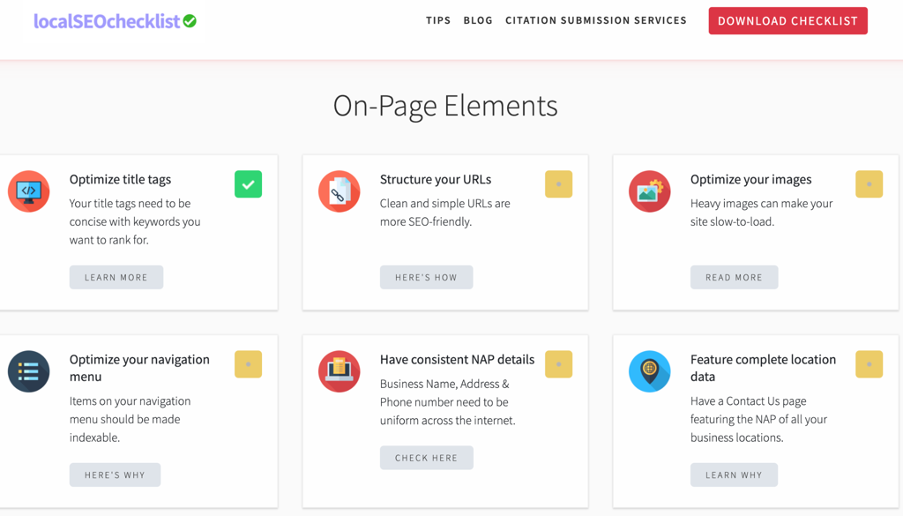
Another way to ensure you aren't missing out on any local optimization opportunities is to run through a local SEO checklist.
The checklist offered on LocalSEOChecklist.com can be referenced as you make optimizations for your client. It lists 30 steps that can boost local SEO performance. If there are steps on the checklist that you haven’t done yet, they may be worth looking into.
Contact IDX
There you have it—fourteen tools and resources to help you improve your local SEO. We hope these tools can help you as you gather data and make recommendations for your business or clients.
Of course, these are only a few of the available tools out there. If you have any local SEO tips you’d like to share, feel free to reach out to us.
We have extensive experience helping brands of all sizes grow their local audiences. Learn more about our approach to SEO.