
How Google's Fact Check Tools and SERP Features Work
In the spirit of International Fact-Checking Day this past weekend, we thought it was prevalent to cover some of the recent updates in Google’s Fact Check Tools and all of the different features Google uses to combat misinformation.
A History of the Fact Check Tool and How it Evolved
Google’s Fact Check Tools have been around for a while, and Google has explored showing fact-check information in various ways throughout different parts of the search engine results pages. In 2016 Google announced the 'Fact Check Tab' during the time of the presidential election. Google then announced that they were enabling publishers to show a fact check tag in its search and news results in early 2017. Google was and currently still does not do the fact-checking itself but instead used results from authoritative resources such as PolitiFact and Snopes.
This led to the necessity for publishers to start using ClaimReview markup along with specific fact-check guidelines if they wanted to be eligible for this feature within the news results. Google has stated, “Only publishers that are algorithmically determined to be an authoritative source of information will qualify for inclusion”. In addition, Google partners with organizations focused on media literacy through the Google News Initiative.
Since 2018, Google has invested nearly $75 million to strengthen media literacy and combat misinformation around the world. A word from Google and YouTube, “Google and YouTube remain dedicated to keep doing our part to help you find what you’re looking for and give you the context you need to make informed decisions about what you see online. And we’re committed to continuing to support the journalists and fact-checking organizations on the front lines of the fight against misinformation”. In addition to that, Google and YouTube recently announced that they provided a $13.2 million grant to the International Fact-Checking Network to launch a new Global Fact Check Fund. This fund will help support multiple fact-checking organizations and help in the fight against misinformation. Changelog and updates made to the Fact Checker Tool can be found here.
What are Google’s Fact Check Tools?
The Google Fact Check Tools feature Fact Check Explorer, Fact Check Markup Tool, and Fact Check Markup API. All three tools aim to facilitate the work of fact-checkers, journalists, and researchers with the goal of giving users and publishers a way to better distinguish and combat misinformation across the web.
Fact Check Explorer
Google Fact Check Explorer is a search function designed to allow users to search by keywords and phrases to see a list of matching claims and the corresponding fact checks. Users can use the Explorer search very similar to how they use regular Google search. Fact checks are included in Explorer if they meet guidelines and are using the correct markup. It is possible to restrict results by language and publisher, or you can view recent fact checks.
Here’s an example of what the Fact Check Explorer looks like when searching for recent fact checks:

Source: Google
Fact Check Structured Data (ClaimReview)
ClaimReview markup is a structured data property that allows pages that review claims made by others. In direct technical terms from schema.org, it is, “A fact-checking review of claims made (or reported) in some creative work (referenced via itemReviewed)”. ClaimReview structured data, when implemented correctly, can enable a summarized version of your fact check to display in Google Search results for relevant queries pertaining to the claims made.
Fact Check Markup Tool
Similar to Google’s Structured Data Markup Helper, the Fact Check Markup Tool allows users to add and view their ClaimReview markup, allowing easy access to Google, Bing, Facebook, researchers, and other interested parties. People interested will need Google Search Console to be able to access this tool.
Before this tool, one of the only ways to provide a ClaimReview markup for a URL was to embed the markup in the HTML of the article. This process can result in human error, and the Markup Tool aims to make that process easier by submitting the structured data via a web form versus needing to add anything to the article itself. Google has stated, “Markup created with this tool will be treated the same as markup that was embedded in the article directly”.
Here’s an example of what the Fact Check Markup Tool features:

Source: Fact Check Markup Tool
Fact Check Markup API
Google has a ClaimReview read/write API that allows webmasters to make changes to a site’s markup using this API, although users must be authorized through Google Search Console to use the tool. This tool primarily creates, adds, and deletes ClaimReview markup for a site’s fact-checking articles or URLs. The Google Fact Check Tool API can also query the same Fact Check results from the Fact Check Explorer.
How Fact Checks Show in Search Results
Here are some examples and information on how fact checks can show up in different types of search results for different queries:
Within Google Search
If a site has fact-checked a claim related to a user’s search, it is possible to see a search result with a small box that tells users:
-
The claim being checked
-
Who made the claim
-
The name of the publisher doing the fact check
-
A summary of the publisher’s fact check

Source: Google Search
Within Google News
These Fact Checks can be found in a couple of different places within Google News. You can find articles with fact checks by news publishers, along with a full section dedicated to Fact Check news:
-
“Top stories” articles have a "Fact check" label.
-
Dedicated "Fact check" section.
-
On a computer: A "Fact check" card on Google News is available is some countries.

Source: Google News
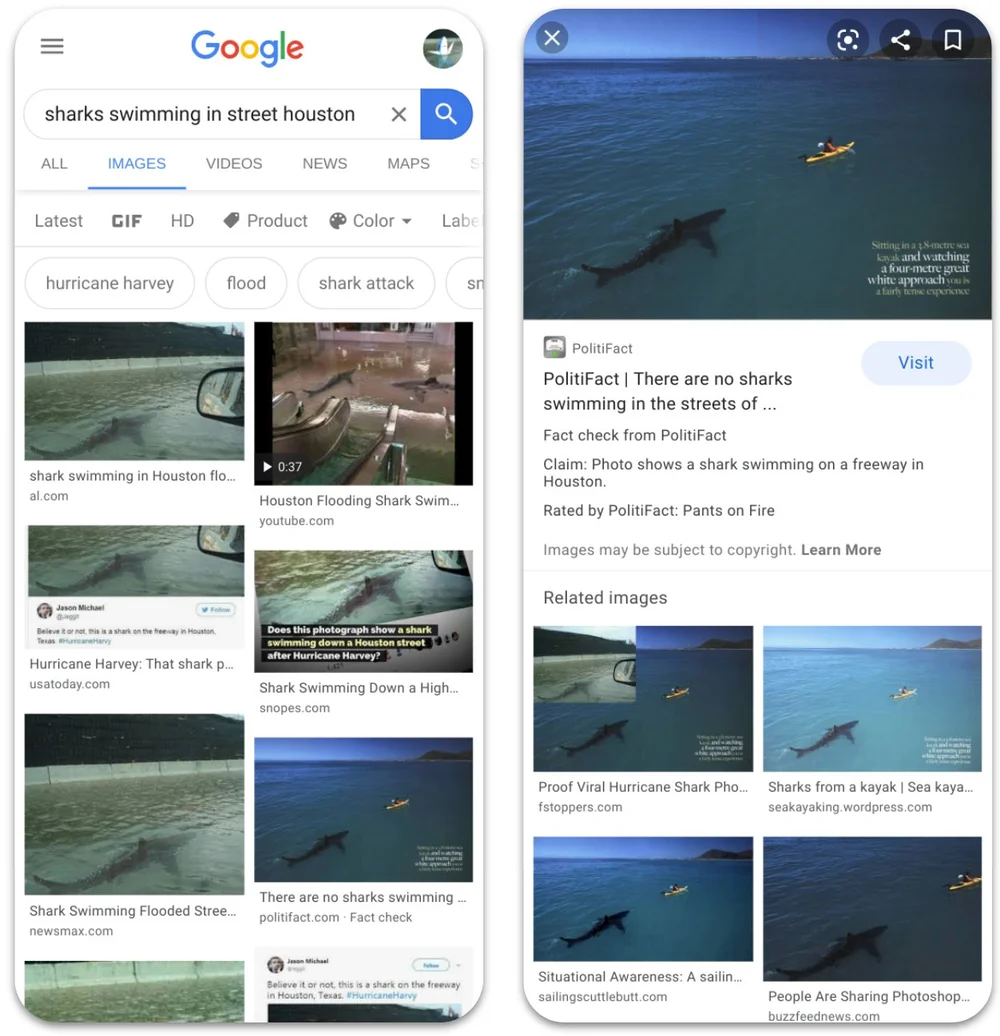
Within Google Images (Top Level):
-
A "Fact Check" label on the thumbnail
-
The name of the domain doing the fact check
Within images hosted on Google Images:
-
The claim itself
-
The name of the publisher doing the fact check
-
A summary of the publisher's fact check
Source: Google
How Does Google Determine a Fact Check?
If a fact check made by a publisher meets certain requirements, Google automatically shows a summary of that fact check. To summarize those requirements:
-
The publisher of the fact check must be a trusted source of information (determined by an algorithm)
-
The content must clearly tell you:
-
Which claims are being checked
-
Conclusions about the claims
-
How conclusions were reached
-
Citations and primary sources of information
Keep in mind that Google does not endorse any of these fact-checks.
How Google Fact Check Tools Help Users Verify Information
-
Google highlights relevant fact-check articles in results in Search, News, and Google Images to ensure context is present while searching.
-
YouTube has Fact Check panels appearing at the top of search results for queries related to a specific claim. This panel helps provide viewers with additional context. These panels are only available in six countries, and Google is working to roll them out in additional markets.
-
There is a Fact Check section in Google News on the desktop. This section shows the original claim made, along with the fact-checked assessment from independent organizations.
-
Fact Check Explorer searches claims from reputable publishers.
How You Can Use Fact Check To Enhance Your Content
Structured data makes content eligible for rich snippets throughout the Google SERP. Those rich snippets help increase organic visibility for a piece of content and can result in an increase in impressions and clicks. As seen above, Fact Check snippets appear in multiple spots throughout Google. If your site is a trusted source of information and your content addresses claims, then you may want to look into implementing ClaimReview schema to allow that content to be eligible for Fact Check rich snippets found in Google News and other areas in the SERP.
People are using Google Search to verify information more and more as the search engine and content evolve. Fact Check markup gives news and claim-based sites an additional opportunity to appear in highly relevant, specific, and granular snippets related to users’ queries. If Google accepts your markup and serves your content in the Fact Check appearances across the SERP, this improves the trustworthiness and authority of the site because Google is using your content as another source of claim review and is seen as a trusted source of information.
Speaking of trustworthiness and authority, this is becoming increasingly more important with Google’s focus and advancements on E-E-A-T (Experience, Expertise, Authoritativeness, and Trust). Google’s goal is to serve the most relevant and factual results and information to its users. These signals are relevant to the assessment of the site's eligibility to appear for claim review-rich snippets. Creating accurate, well-informed, and honest content will help your site continue to gain trust with the algorithm and the users who interact with your content.
Contact IDX
Ready to take your brand's search engine optimization (SEO) to the next level? Explore our expertise and see how IDX can help you improve your online presence today. Don't wait - contact us now to learn more about how we can help boost your customer engagement and drive results for your brand.