Google Analytics 101: Best Practices for eCommerce Sites
Running an eCommerce website is more than just looking at revenue month to month. So much more. If you are only using that one metric to guide your company, you are missing out on a whole world of valuable information that is right at your fingertips.
We're talking about Google Analytics for eCommerce.
At first, the whole idea behind tracking the nuanced analytics of your site can seem downright harrowing. But with time, practice and the desire to learn, the learning curve isn't as daunting as it seems.
The first key to getting on the right track is ensuring that the tracking programs you have installed are in good, working order. Having website analytic programs properly installed and gathering correct data is important for many reasons including the very obvious: how can you analyze data and make informed decisions when your data is incomplete?
When it comes to website analytics, there are quite a few items you’ll want to have a thorough understanding of in order to ensure you’re tracking the right data. Google Analytics for eCommerce and the best practices for setting up the tool on your site is what we’ll cover in this post.
How to Get Started with Google Analytics for eCommerce
One of the most important first steps to analyzing data from your website visitors is thinking about the key performance indicators (KPIs) important for your analysis. Think about the data you want to analyze before you get too technical with installation. Trust me, thinking about your data from a business perspective first will help you during the set up process. Determine what data you need that will drive actions.
eCommerce KPIs
An article by GoDataFeed earlier this year provides 7 Key Performance Indicators Online Retailers Need to Know and Kaushik.net covers “Six Web Metrics/KPIs to Die For” I’d suggest checking out. Some of the most important KPIs discussed for your online store may include:
- Final sales: daily, weekly, monthly, quarterly, annually
- Shopping cart abandonment
- Conversion rates
- Order size
- Site traffic
- Time on site
- Pages per visit
- Traffic sources
- Social media conversions
- Bounce rate
- Highest traffic pages/content
- Assisted conversions
Each of the above KPIs can help you make informed decisions about your online store. The time on site and pages per visit, for example, can give you an idea of how visitors are viewing your products, window shopping, and navigating your website. Setting goals to keep people in your store longer and visiting more pages can be good goals to set after examination of this data set.
Looking at assisted conversions, for example, is a great way to see the many touch points a visitor might have before making the final purchasing decision. From PPC, to social media to direct visit and then final sale, many visitors may follow the same path before conversion which can help you direct marketing efforts in each of those areas to improve sales.
As you can imagine, the above KPIs prove extremely helpful when determining actionable steps to take for your business. Dive deeply into possible KPIs for your business before you get started.
Installing Google Analytics on your eCommerce Site
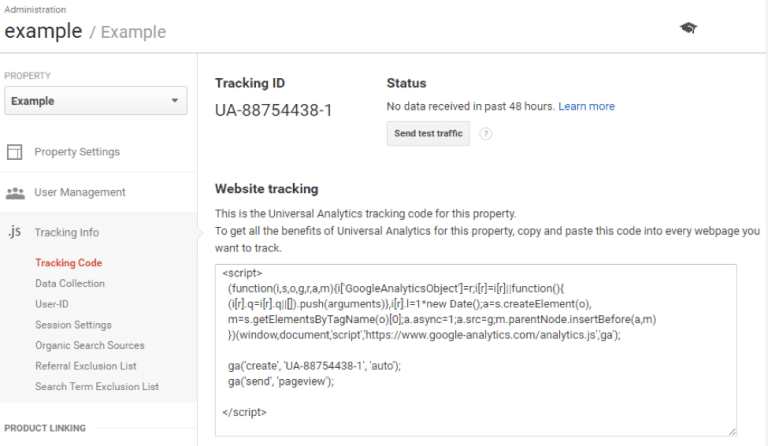
Google offers website analytics for free on both websites and applications, with eCommerce tracking available to let business owners get granular with online shop’s website data. Follow the below steps to install Google Analytics on your eCommerce site.
- Create a Google Analytics account and go through the prompts on Google.com/Analytics/ to understand more about this free service.
- Load the Ecommerce Plugin to your site to start tracking eCommerce data using analytics.js.
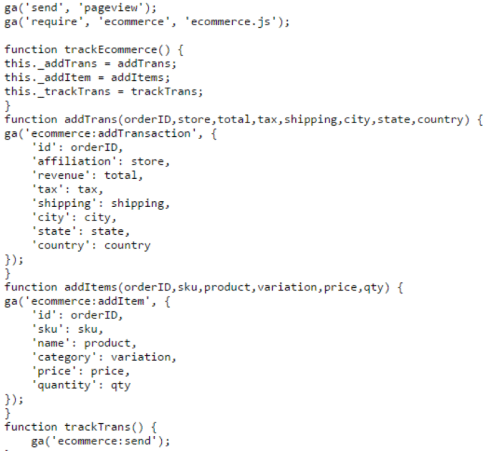
- Adding a Transaction – Use this to initiate a transaction object. This helps store all the information about a single transaction such as the ID, shipping charges, and Affiliation or store name.
- Adding Items – This implementation tracks information about each individual item in the shopping cart and associates with each transactionId field, tracking items such as the SKU, price, category, and quantity.
- Send Data to the Analytics Servers – This command will take the data from each transaction and item in shopping carts and sends it to Google Analytics. Once this command is initiated, previous data will be cleared and only new transactions and items will be sent to Google Analytics.
- Establish ocal Currencies – For eCommerce websites that work internationally, Google offers an option to specify local currencies (ISO 4217).
Depending on your eCommerce engine, there are many ways the above information can be retrieved. Some recognize Google Analytics and provide modules to ease the process of order tracking. Check with your eCommerce engine to determine if there is an automated way of retrieving this data. The image below shows you a sample configuration of eCommerce tracking, using the methods listed above. Additional resources are provided for your review.
More Resources
- How to Create a Tracking Plan
- An Introduction to Google Analytics for eCommerce
- Five Google Analytics Features Every Website Owner Should Use
Enabling eCommerce Tracking for Google Analytics
The below instructions will aid in enabling eCommerce tracking for Google Analytics, but something to take into consideration first is determining if you need cross-domain tracking. Determine if you’re using a third party shopping cart, or if you track transactions across different domains (for example: shoppers view products on domain.com but when purchasing are redirected to domain2.com). You’ll want to follow the cross-domain tracking instructions found here before modifying the tracking code for setting up eCommerce transactions. The below instructions are assuming your shopping cart software and eCommerce site are on the same domain.
- Click Admin at the top of your screen in Google Analytics after signing into your account.
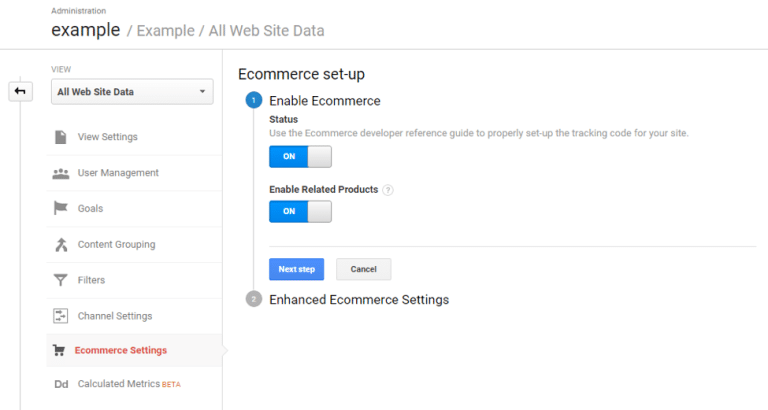
- Select the account and then the property you wish to add eCommerce tracking on. Under the view level, select the Ecommerce Settings, switch to ON under Enable Ecommerce
- Enable Related Products is optional; this allows Google Analytics to gather data from transactions to find trends on what products are frequently bought together.
- Add the eCommerce tracking code (analytics.js) (also listed as the last step above)
Understanding Google Analytics Metrics
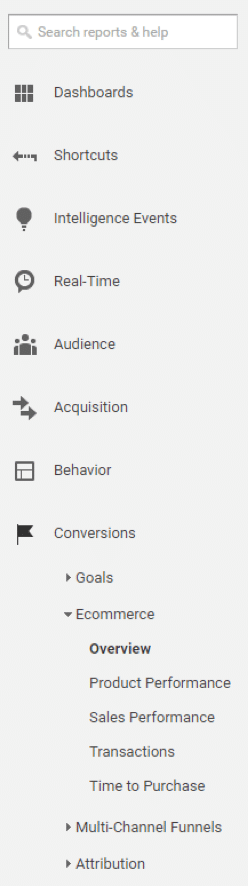
Once tracking code has been installed and eCommerce tracking enabled, you’ll be able to log into your analytics account and start reviewing data. Please note: data will be collected from the day you install, not retroactively. The service offers many data sources to delve into, and we’ll go over a few of the most important sections of Google Analytics for eCommerce. All these areas can easily be found in the left-hand navigation:
Real-Time Data
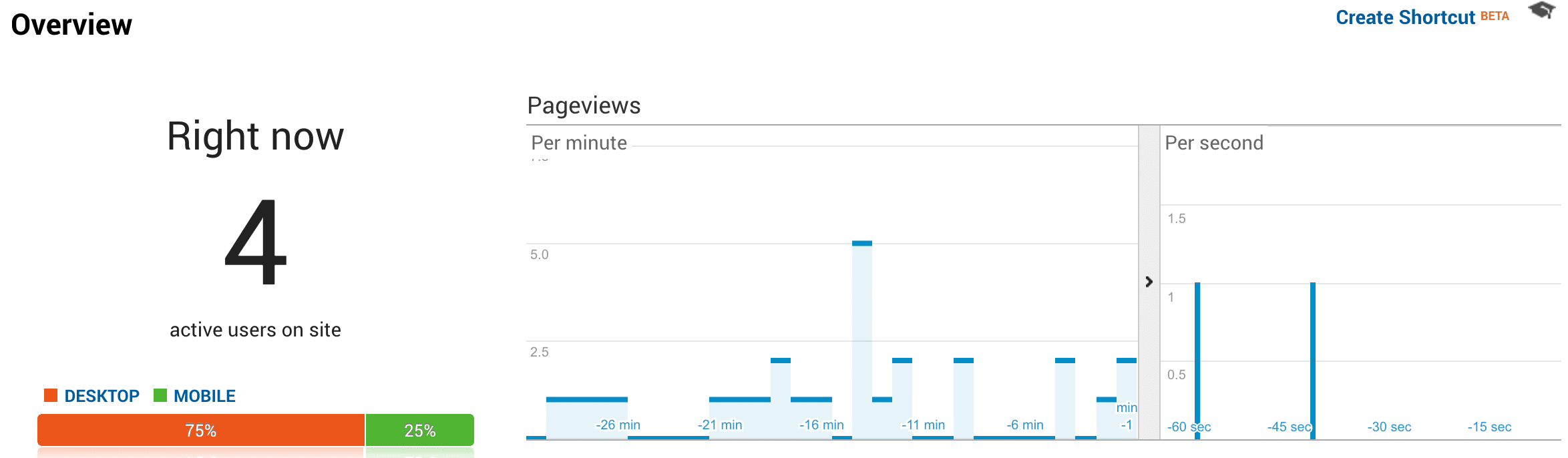
The data in the Real-Time overview allows you to see the visitors on your site in real-time including traffic sources, locations, conversions and top active pages as well. This real-time data can be important to help you understand how visitors are navigating your site at peak times, monitoring in real-time a campaign you’re running or measure the launch of a new product. Make swift changes to campaigns or product launches after reviewing real-time data to get the most out of your marketing dollars.
Audience Data
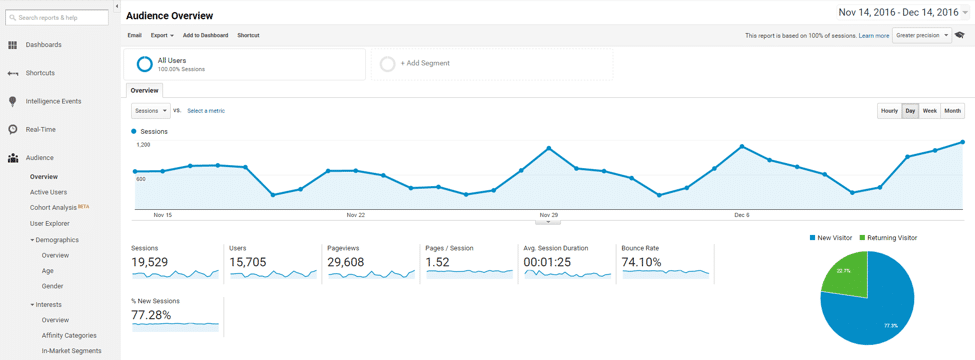
This view allows for the monitoring of demographic data of visitors, behavior (new vs. returning, frequency & recency, engagement), technology used to access the site, mobile information, and user flow or the path visitors take on the site. When analyzing the data contained in the audience view you’ll be able to get very granular with examining your visitor traffic. Compare month over month, year over year and quarter over quarter data by adjusting the dates found at the top right of the screen. Use the information you glean in the visitor flow view to make improvements to your site, understand the type of technology used to access your site or number of mobile visitors to improve your site as well. Understand cyclicality in your industry by monitoring the days, weeks and months of high traffic volume. A lot of data can be examined and utilized in the audience view.
Acquisition Data
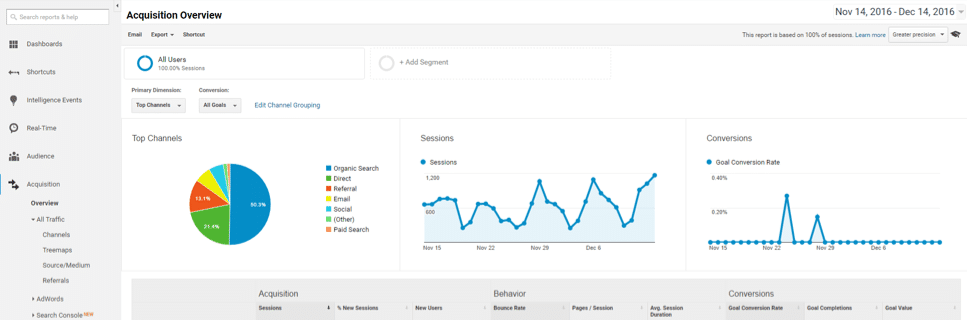
Understanding where your traffic comes from can be seen in the Acquisition view including: all traffic, search console, social, campaigns and Adwords. An under-performing marketing channel can be easily examined by drilling down in the sources view. You might be surprised that a third party shopping platform you pay on a monthly basis doesn’t refer as much traffic as originally estimated. Additionally, an over-performing marketing channel could be discovered and thus allow you to make the decision to put more effort in that channel over another marketing effort. This can sometimes be the case when examining the social view, showcasing social network traffic referrals, top landing pages, conversions and users flow. If social traffic is converting higher than other channels, it may be worthwhile to consider placing more emphasis on.
Behavior Data
The pages that visitors frequent the most on your eCommerce site can be seen in the behavior view of Google Analytics. Not only individual pages but additionally site speed, site search, events, publisher (AdSense), and in-page analytics can be reviewed. Understanding page timings and user timings may uncover site issues you’re not aware of.
Site search often uncovers keywords users are searching for on the site using the sitewide search, if common keywords come up you may consider testing the addition of that product or category in the navigation or on the homepage. In-page analytics can help you see where visitors click the most or travel to the most from a core content page. Individual pages can be examined to discover how long visitors were on a page, which pages convert the most, and other important per page analytics.
Conversions Data
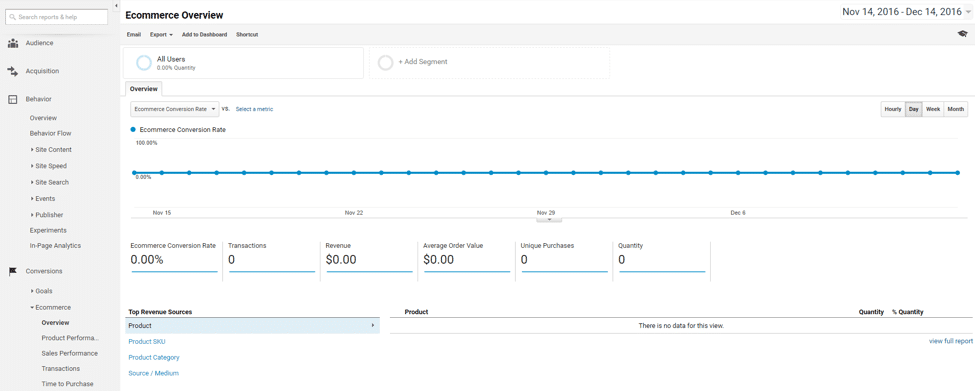
For an eCommerce site the conversion data view is likely the most important. Here you’ll be able to review goals, eCommerce data, multi-channel funnels and attribution. If you set up goals, the goal section allows you to see how well they performed and how often visitors converted based on the goals you set up. eCommerce data provides a much more in-depth review of individual sales including: transaction, product performance, sales performance, and time to purchase.
A particular product may not convert as well as you thought it should, the data contained in the eCommerce view will share this information with you and allow you to compare to previous sales periods by changing the date range of the . The follow is an in-depth look at the eCommerce features within the conversion data:
- Product Performance: Use this report to gain insight into how customers interact with your products. You’ll be able to break data down into the product name, quantity, revenue average price and quantity sold per transaction.
- Sales Performance: This is a useful tool to assess how revenue is generated over periods of time. It makes it easier to spot trends, whether sales tend to peak around certain months or days.
- Transactions: If you need to find a certain sale or transaction, the ecommerce code will grab the transaction ID and place it into this report. It’ll break down each transaction by its revenue, tax, shipping cost, and quantity.
- Time to Purchase: This report will break down how long it takes before a user makes a transaction. You can sort this by either days or sessions to transactions.
Time to Act Now
Multi-channel funnels are especially helpful in understanding top conversion paths, assisted sales (sales that were assisted by other marketing channels such as social or PPC), and conversion path length – or the number of times visitors came to your site before converting. Each of these data sets allow you to make important decisions for your online store.
As you can see, a lot of information is contained in Google Analytics for eCommerce. Understanding important KPIs, how to properly set up Google Analytics, and the type of data you can review are all key areas of understanding how to best use the analytics program for your online store. It can be quite a large undertaking to start using an analytics program or deepening you existing use, but try not to get too frustrated. The amount of information you’ll be able to use once your familiarity with the program improves can greatly affect your business and allow you to make important business decisions vital to the future success of your eCommerce store.