

Facebook Conversions API: What You Need to Know
Internet users have increasingly demanded more data privacy and greater control over how their information is used. Tech companies are listening and responding.
Web browsers, including Mozilla, have made it easier for users to block cookies from digital advertisers. The General Data Protection Regulation now mandates EU-based websites to ask users for permission before placing advertising cookies. iOS 14 turned off Identifier for Advertisers by default.
Such developments have bolstered consumer privacy while making it difficult for digital marketers to measure ad campaign conversions.
Facebook is attempting to address these challenges for digital marketers with business tools like Conversions API.
What is Facebook Conversions API?
Conversions API is a Facebook business tool that uses Facebook Pixel, which relies on browser cookies, to pass customer actions and conversion events directly from the brand’s servers to Facebook databases. This allows digital marketers to access conversion data when customers have blocked cookies in their browser or on their mobile app.
What Does Conversions API do?
Conversions API measures conversions at the server level. Facebook Pixel measures conversions at the browser level.
Browsers are susceptible to cookie restrictions, loading errors and connectivity issues. Server-side reporting can alleviate these pain points. Conversions API was designed to be used with the Facebook Pixel, not to replace it. Used together, advertisers can enable one of Conversion API’s most valuable features: Advanced Matching.
Advanced Matching provides two enhancements to conversion measurement:
- Reliability. Advertisers can capture conversion information at the server level when browsers fail to record it
- Visibility. Advertisers can access additional data points like CRM data, lead scoring and multi-site conversion paths.
When implemented alone, advertisers can use Conversions API to control what data they send to Facebook and append additional metrics like product margins or customer value scores. This is particularly beneficial for industries with heightened security restrictions that can’t implement browser-level tracking.
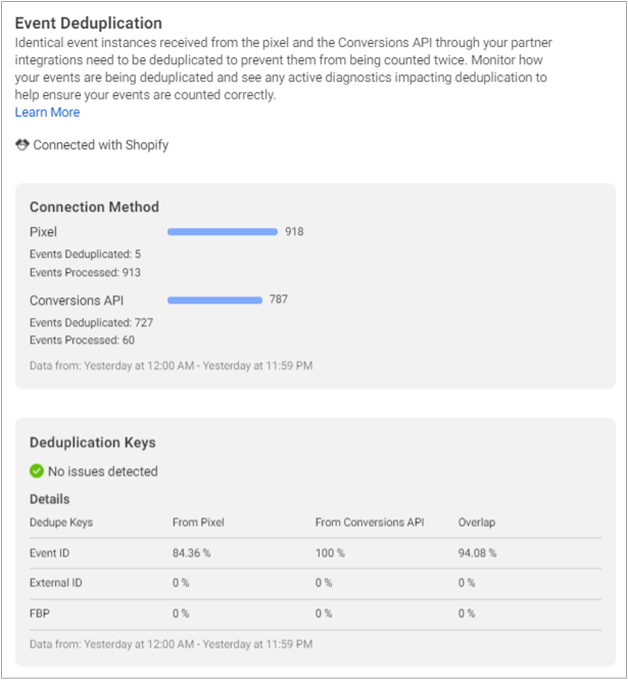
Facebook also uses unique user identifiers to dedupe the pixel and conversion API data. This prevents events from being counted twice.
Getting Started With Conversions API
Facebook outlines these steps for getting started with Conversions API:
Pre-Installation Steps
These steps involve securing buy-in from key stakeholders, including marketing executives, legal counsel, IT manager and analytics specialists:
- Secure buy-in within your organization.
- Onboard a developer or solutions partner.
- Approve data sharing with your legal department.
Post-Installation Steps
These steps involve testing and optimization:
- Install and test your data connection.
- Start passing data to Facebook.
- Use improved measurement to optimize campaigns and targeting.
Installing Conversions API
After you’ve secured buy-in from key stakeholders, there are two options to consider for installing Conversions API. You or your developer can connect the API manually with code or automatically through a partner integration.

Connecting by Partner Integration
Partner integrations are available for multiple content management systems and e-commerce platforms, including WordPress, Shopify and Magento.
Installation is also available using Google Tag Manager, which requires Google Analytics 4— Google’s cookieless analytics solution. If you use Google Analytics Universal or 360, you should implement an instance of GA4 to integrate Conversions API using Google Tag Manager.
Connecting by Manual Installation
To manually integrate the API with your server, you can use Facebook’s developer documentation or create personalized set-up instructions in Event Manager and send them to your developer.
Advanced Matching
When using Conversions API with Facebook Pixel, you can enable Advanced Matching. This feature combines pixel events with customer information, which can provide more reliable conversion measurement on Facebook ad campaigns. By improving conversion measurement, Conversions API can:
- Increase the conversions attributed to your ads
- Increase your custom audience size for retargeting
- Decrease cost per conversion with conversion-optimized campaigns
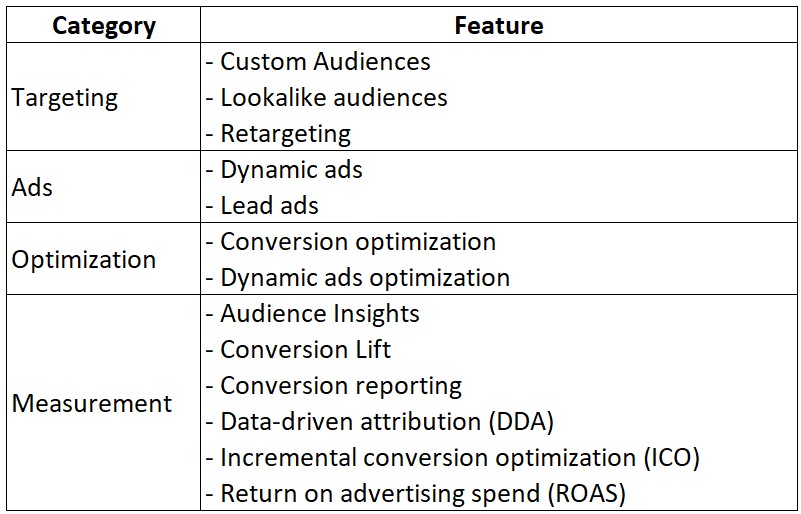
Advanced Matching may improve your performance if you use any of the following advertising features:
Enabling Advanced Matching
Facebook recommends using both the manual and automatic options to enable Advance Matching, when possible. Manual and Automatic Advanced Matching collect data in slightly different ways. Enabling both options casts a wider net.
Following are Facebook’s tips to help you decide which method is right for you:
- Use Automatic Advance Matching if you don’t have access to a developer
- Use Manual Advanced Matching if your:
- Pixel is in an i-frame
- Using an IMG pixel
- Business is in a regulated industry
- Website users can remain logged in for long periods of time
Automatic Advanced Matching
Automatic Advanced Matching is the simpler option that is enabled through Events Manager. It tells your pixel to match a website event with a Facebook user by using recognizable form fields such as user name and email address.
Once matched and the conversion is measured, Facebook hashes all personally identifiable information. However, Automatic Advanced Matching is not available when using an iframe or IMG pixel. Nor is it available for certain businesses in regulated verticals.
When using Automatic Advanced Matching, follow these tips:
- Ensure that your landing page contains fields to collect relevant information such as name, email address and phone number.
- Place the pixel on pages where visitors will enter this information
Manual Advanced Matching
To set up manual Advanced Matching, a developer must modify the Facebook Pixel’s base code to pass a recognizable form field as a parameter for pixel initialization. As an example, this might be an email address. Upon receiving the PII, the pixel automatically hashes the visitor's input and registers the conversion. Unlike the automatic option, Manual Advanced Matching can be used in an iframe with an IMG pixel and for any business vertical.
Development Roadmapping Informed by Millions of Users
With IDX’s technology you can:
- Launch a custom website
- Monitor your traffic
- Measure your success
- Secure your information
- Visualize your data
- Scale as you grow
From security to cloud-hosting, IDX works with the best technology providers in the world, seamlessly integrating every element into our super-secure content management platform. We add our unique functionality to make it even better. Learn more about social media offerings here and to reach out to our experts, click here.