
10 Tips to Prepare Speakers for Virtual Events
Webinars and virtual events have represented strong tactics to generate demand for many years now, but in light of the pandemic, the digital channel has grown exponentially with no signs of slowing down. Managing an event successfully requires planning and coordinating several moving parts, such as finding the right platform, attracting the right audience, and presenting the right content. But there is one factor that, no matter the format, will make or break your virtual event – the speakers.
Personality, expertise, confidence, and credibility have always been core traits of great speakers. One trait consistently separates great speakers from not-so-great ones: preparation. And event planners play a key role preparing them. Taking the right steps and planning ahead means you’ll enable speakers to present themselves in the best possible way, be confident the technology is going to work, and take care of all practical aspects so that they can focus solely on providing value to attendees and meeting their expectations.
10 Tips for Preparing Speakers
At Investis Digital, we have been helping our clients host a wide range of virtual events, before and after the pandemic outbreak. Along the way, we’ve learned a great deal about what steps and processes are more effective to make sure speakers are well-prepared and comfortable:
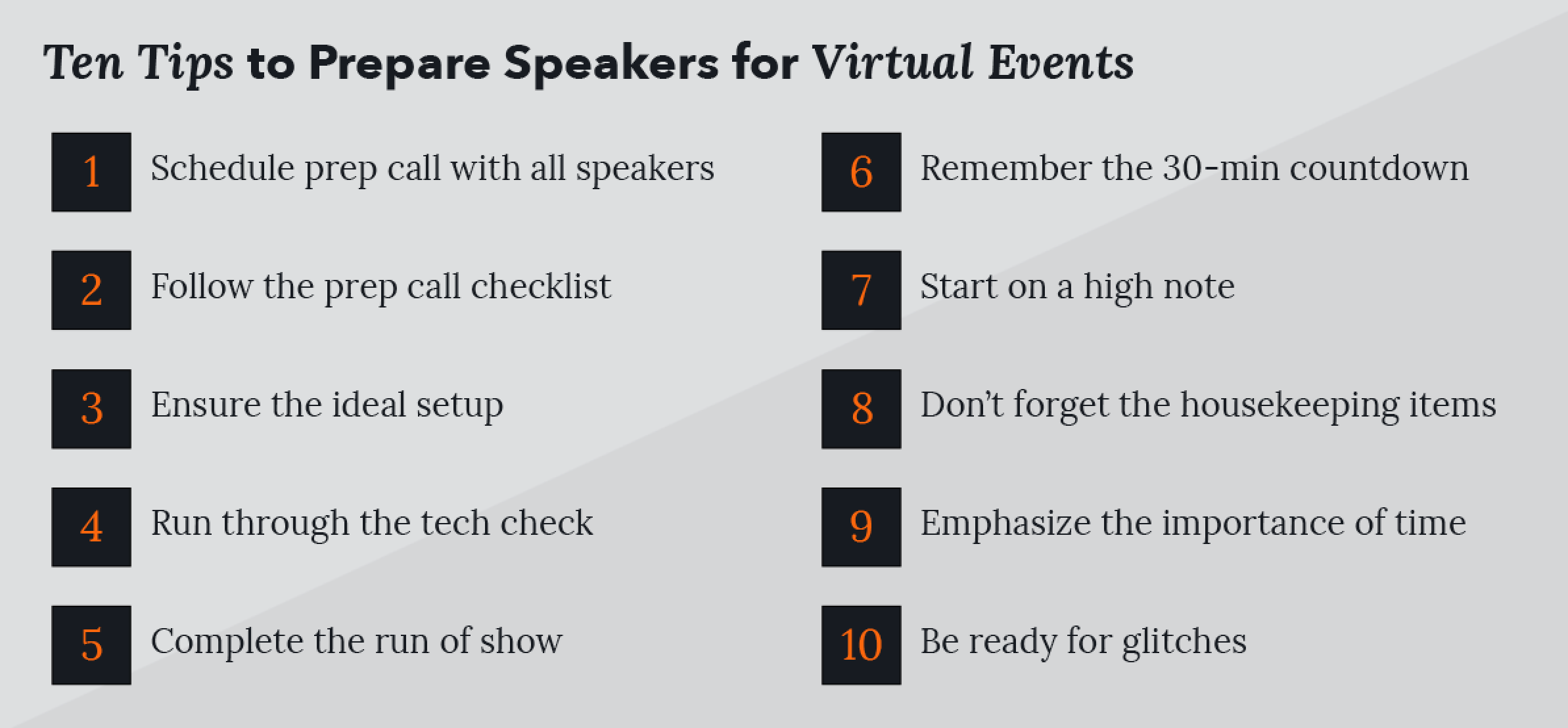
- Schedule group prep call with all speakers. Once your speakers’ lineup is confirmed, get a group prep call on the books as soon as possible. This will be a chance for everyone to get to know each other, clarify roles and responsibilities, and outline the next steps up until it’s showtime.
- Follow the prep call checklist. Ideally, the person who hosts or moderates the event also manages the speaker prep call. During the prep call, the host should cover key points such as you how you will manage introductions and roles during the event; agree on how the show is going to flow; and make sure everyone is comfortable with the topics they are going to cover. Once this is all clear, the marketing and/or event team, can jump in and go through the tech check (e.g., platform, sound, video, setup) and the logistics (e.g., time, date, audience, interactivity features, like Q&A, and polls). Once all doubts have been clarified and the speakers’ questions have been answered, a recap email is a great way to make sure nothing is missed or lost in translation.
- Ensure the ideal setup. We have all become Zoom and Teams pros at this point, and we have identified our best angle and lighting in our home office. Preparing the right sound and lighting setup is especially important when preparing a speaker for virtual events. Doing so will also allow the audience to get the best possible experience as viewers and lend a professional touch to the experience. During the prep call, it is important to check that the speaker’s head is centered in the shot, that they have great lighting in the room, and the webcam is at eye level. It’s also good to advise them not to wear horizontal stripes or distracting patterns and wear headphones or mics if needed. We always advise avoiding blurred backgrounds, if possible, and checking if they’re comfortable with what the audience is going to see as they speak. For example, if they’re sitting in front of a bookshelf, make sure they are comfortable with the books they are showing and any family pictures or poster that may be part of the shot, which is especially relevant right now with so many events being hosted in our homes during the pandemic. If budget and timing allow, it’s great to provide the speakers with a printed banner or other branding elements that create a connection with the theme of the event.
- Run through the tech check. It’s essential that speakers are clear with the platform you (and they) are using, which functionalities it entails, and whether you plan to include audience participation features, such as Q&A, chats, networking channels, and polls. When it comes to a speaker’s connection and equipment, remind everyone to ask children and roommates to avoid using applications that consume too much bandwidth on the day of the event, mute their notifications, silence their mobile phones, and make sure their laptop is fully charged.
- Complete the run of show. Especially if you have multiple speakers taking part in your event, it is a good idea to prepare a run of show that breaks the session down into separate chunks (intro, Q&A, closing, etc.) and confirm the number of slides each speaker is going to present. At Investis Digital, we find that when speakers are familiar with the run of shows, it allows for a fluid and natural event with seamless transitions. Producing a thorough and effective run of show can be a tricky and time-consuming job. So we have spared you the trouble and created a template that you can download here.
- Remember the 30-minute countdown. Although your speakers are surely very busy professionals with demanding schedules, it is important to ask them to connect to the platform 30 minutes before the start of the live event. This will give you and your team enough time to run through a final tech check, troubleshoot any setup or connection issues, and review the logistics and flow while calming any pre-event jitters.
- Start on a high note. Now, more than ever, it’s all about establishing a connection with the audience. So starting off on the right foot is a key ingredient to success. A snappy introduction will set the tone for the rest of the event and build the audience’s anticipation. Make sure the host has all the information they need to set the scene -- not only in regard to the content the audience is going to hear but also the people they’re about to hear from.
- Don’t forget the housekeeping items. The beginning of the webinar is also the right time to cover the housekeeping bits. If you plan to use interactive features during your events (e.g., polls, voting, and question tabs) make sure your host spends enough time explaining what they are and how they work. Sometimes it takes time for the audience to warm up. So if you’re planning a Q&A with speakers, don’t shy away from preparing a few canned questions to spark the conversation. Also note that some people will join late. So it’s a good idea for the host to remind the housekeeping bits halfway through and keep encouraging people to engage and interact.
- Emphasize the importance of time. In an in-person event, speakers might have some leeway to run overtime, but that is not the case in the virtual world. Make sure all speakers are clear on how much airtime they’re getting during the live event and ask everyone to be respectful of that. Your audience is just one click away from leaving your webinar. If you keep the event succinct and engaging, they will leave craving for more, and your post-event strategy will be more effective.
- “You’re on Mute”: be ready for glitches. No matter how much you prepare and troubleshoot in advance, glitches can still happen. That’s the beauty of live events. Don’t panic. If a speaker forgets to unmute themselves while speaking, the moderator can gently remind them to do so; another great tip is for your tech team to prepare backup headshots for all speakers to display in case of connectivity issues that do now allow their video to display perfectly
A successful event lies in the preparation, and if you follow our tips you can rest assured your speakers will get excited and present themselves to your audience in the best possible way. Are you planning a virtual event at the moment? Get in touch with our team of professional event producers to find out how we can help! Also, download our Guide on Webinars, Webcasting and Virtual Events. This guide provides you with all the insights you need to create close emotional bonds with your audience at scale, get high attendance and engagement, faster and more cost-efficiently than you would with an offline event.
The guide builds off the expertise of Investis Digital Live, which is our is our in-house Webcasting, Webinars, and Live events service. We support more than 750 global events a year through a team of dedicated professionals and our proprietary technology solutions. We are the event experts.
Related:
“With Virtual Events Likely Here to Stay, Make Them Work for You,” Don Scales, February 10, 2021.
“Pre-recorded or Live: Which Is Right for Your Virtual Event?” Frank Persia, February 4, 2020.
“Why the Right Format Can Make or Break Your Virtual Event,” Frank Persia, January 7, 2020.
“Why Content Drive Your Virtual Event,” Frank Persia, December 22, 2020.
“Why a Strong Strategy Must Define Your Virtual Event,” Frank Persia, December 10, 2020.
“Running Successful Events, Virtually,” Harriet Hall, December 8, 2020.